Use a shutter speed no longer than the time your subject takes to cross the frame, divided by 1,000. A subject that crosses the frame in one second needs about 1/1000 second to look sharp when the whole picture is seen on a screen or a print. One that takes four seconds needs 1/250. If you will inspect a 24-megapixel file at 100% or crop it hard, divide by about 3,000 instead. A runner's feet and a wheel's rim move up to twice as fast as the subject, so halve the time again when they must be sharp.
That one number, the crossing time, already contains everything a shutter-speed table leaves out: how fast the subject moves, how far away it is, the focal length, the sensor and the direction of travel. A fast runner 15 metres from an 85 mm lens on full frame needs 1/1000. The same runner on the far side of a field, 50 metres away with the same lens, needs 1/320. A table that says "running: 1/1000" is right for one of them.
Motion blur is the share of the frame the subject crosses during the exposure
Motion blur is the distance the subject's image moves during the exposure, and it is easiest to judge as a fraction of the picture's width. Measured that way, it doesn't matter what sensor or lens made the picture:
Blur, as a fraction of the frame width = distance the subject moves during the exposure ÷ width of the scene at the subject's distance.
A cyclist who moves 1 centimetre during the exposure, across a scene 10 metres wide, smears by 1/1000 of the frame width. On a picture shown 1,920 pixels wide, that is about 2 pixels.
The width of the scene at the subject's distance is about distance × sensor width ÷ focal length. Sensor widths are about 36 mm for full frame, 23.5 mm for most APS-C cameras and 17.3 mm for Micro Four Thirds. A 50 mm lens on full frame, 10 metres from the subject, covers a scene about 7.2 metres wide.
Divide that width by the subject's speed and you get the time the subject takes to cross the frame. Shutter speed then falls out directly: the fraction of the frame the subject crosses during the exposure is shutter time ÷ crossing time. Everything else cancels. Sensor size doesn't change the answer once the framing is fixed, for the reason our sensor-size guide gives: equivalent framing and shutter time give equivalent motion blur.
Calculators that work out blur in pixels from speed, distance, focal length and sensor resolution are doing the same arithmetic in more steps. The basic photography course reproduced on DOFMaster gives up on such formulas as "not practical" and offers rules of doubling and halving instead. The crossing time is the practical form: you can see it through the viewfinder.
Decide how much blur the picture can carry
The blur you can accept depends on how large the finished photograph will be seen, so choose the viewing first and the shutter speed second.
| How the picture will be seen | Blur you can accept | Shutter speed |
|---|---|---|
| Whole, on a phone, laptop or a print at normal viewing distance | 1/1000 of the width (about 2 pixels on a 1,920-pixel screen) | crossing time ÷ 1,000 |
| A large print viewed close, a 4K screen, or a crop to half the width | 1/2000 of the width | crossing time ÷ 2,000 |
| A 24 MP file (6,000 pixels wide) at 100% | 2 pixels, or 1/3000 of the width | crossing time ÷ 3,000 |
| A 45 MP file (about 8,200 pixels wide) at 100% | 2 pixels, or about 1/4000 of the width | crossing time ÷ 4,000 |
The first row is close to the sharpness standard behind depth-of-field scales. ZEISS's depth-of-field paper uses a circle of confusion of 1/1500 of the frame diagonal, 0.029 mm on full frame, which is about 1/1250 of the frame width. We allow slightly more for motion blur, because motion smears a point along one line while defocus spreads it in every direction. That is our judgment, not a standard. The simulation below lets you judge it for yourself.
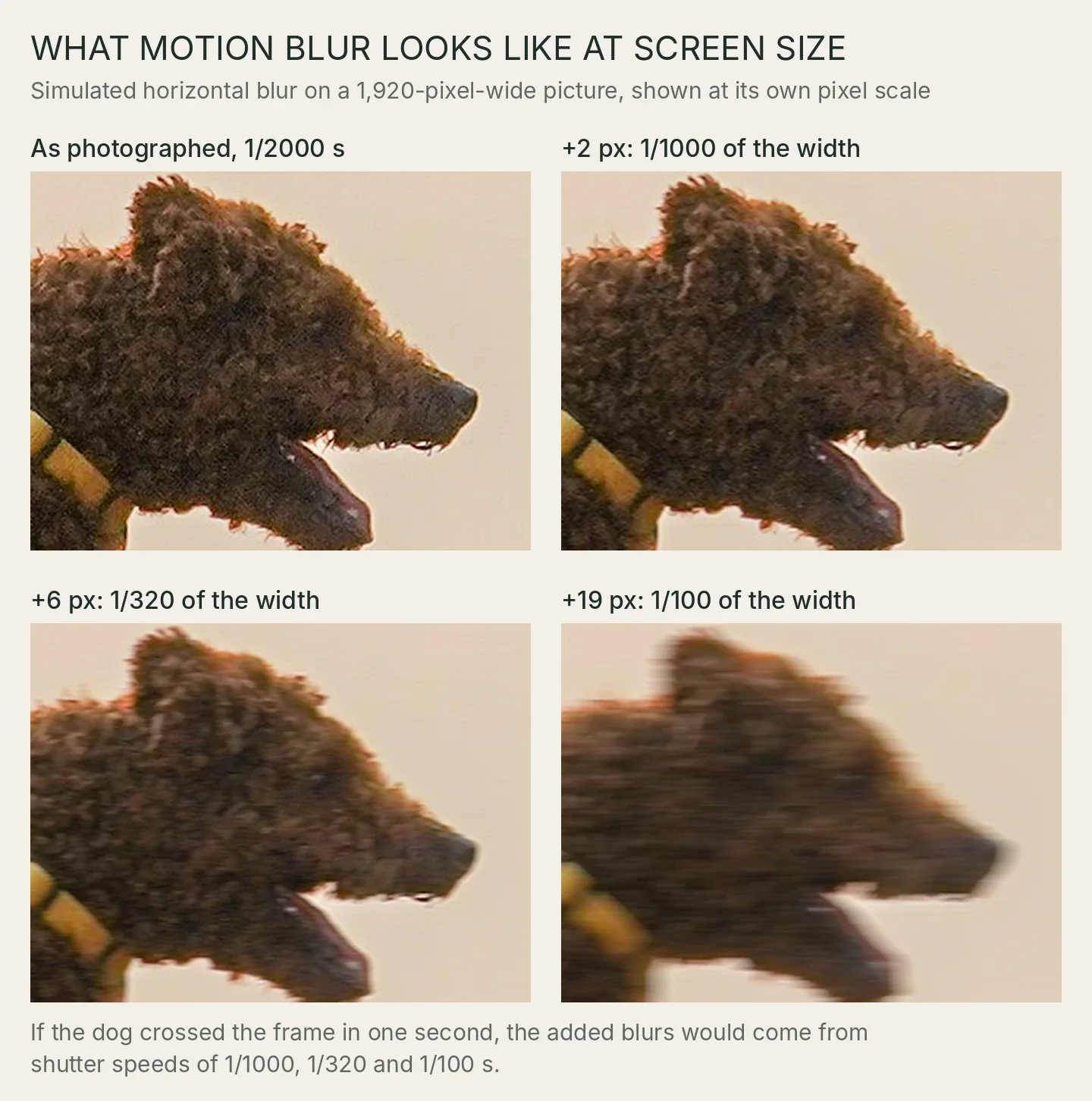
Simulation, not a photograph of motion blur. At this column's full width on a computer, each pixel of a 1,920-pixel-wide picture is shown at about one screen pixel, roughly as large as it looks filling a laptop screen. Crops from a 1,920-pixel-wide version of Timothy A. Gonsalves's photograph of Tapsi, made at 1/2000 s, f/8 and 300 mm, CC BY-SA 4.0. Afterlight added straight horizontal blur to the whole crop in linear light; this adaptation keeps the same licence.

To our eyes, 2 pixels of added blur is hard to see even when you look for it, 6 pixels softens the fur and the harness clip, and 19 pixels reads as a blurred photograph. If the dog had taken one second to cross the frame, those three would correspond to shutter speeds of 1/1000, 1/320 and 1/100.
Cropping moves you down the table. Cropping to half the width halves the scene width, so it halves the crossing time and doubles the shutter speed you need. If you expect to crop, work out the crossing time in the crop, not in the viewfinder. Our comparison of moving closer, zooming or cropping covers what else that crop costs.
Worked shutter speeds for common subjects
These are worked examples at stated distances and focal lengths on a full-frame camera, not measurements of particular subjects. Each speed is rounded to the nearest standard setting that is at least as fast.
| Subject and speed | Distance and lens | Scene width | Crossing time | Seen whole (÷ 1,000) | 24 MP at 100% (÷ 3,000) |
|---|---|---|---|---|---|
| Adult walking, 1.4 m/s | 8 m, 50 mm | 5.7 m | 4.1 s | 1/250 | 1/800 |
| Fast runner, 6.3 m/s | 15 m, 85 mm | 6.3 m | 1.0 s | 1/1000 | 1/3200 |
| The same runner across a field | 50 m, 85 mm | 21 m | 3.4 s | 1/320 | 1/1000 |
| Cyclist on a shared path, 5.1 m/s | 10 m, 35 mm | 10 m | 2.0 s | 1/500 | 1/1600 |
| Car at 50 km/h, 13.9 m/s | 15 m, 50 mm | 11 m | 0.78 s | 1/1600 | 1/4000 |
| Gull in flight, 10 m/s | 40 m, 500 mm | 2.8 m | 0.28 s | 1/4000 | 1/12,800 |
| Racing greyhound, 20 m/s | 30 m, 300 mm | 3.6 m | 0.18 s | 1/6400 | 1/20,000 |
The speeds come from measurements, chosen as typical rather than extreme. Healthy adults walk at a mean of 0.94 to 1.43 metres per second depending on age and sex, in Bohannon and Andrews's meta-analysis of 23,111 people. 6.3 m/s, about 2 minutes 39 seconds per kilometre, is a fast submaximal trial from a study of 40 athletic runners whose speeds ranged from 3.1 to 10.0 m/s; a recreational jogger at half that speed needs half the shutter speed. Riders on Sydney's shared paths averaged 18.4 km/h, with a median of 16 km/h. Tracking radar put the cruising airspeeds of 138 migrating bird species between 8 and 23 m/s, with gulls, songbirds and birds of prey in the lower part of the range; a bird's speed over the ground also includes the wind. Racing greyhounds gallop at almost 20 m/s.
Two things stand out. The "seen whole" column lands close to the familiar advice: 1/250 for walking, 1/1000 for running, thousandths for birds. So the usual tables work, for one viewing size and one framing. And the 100% column is three times faster. That is why a picture that looks crisp on a phone can look soft when you zoom in on a high-resolution file: the same blur covers more pixels at pixel level.
The calculation uses the thin-lens field width and a full-frame sensor 36 mm wide. Change the format and the focal length together to keep the same framing, and the answer stays the same.
Find the crossing time before the moment
You can measure the crossing time before the subject reaches the spot where you want the picture. Pick the method that suits how fast it moves.
- Frame the shot you intend. Use the focal length and distance you will use, and imagine any crop you plan.
- For fast subjects, time it with a burst. Hold the framing still and shoot a short burst as the subject, or the same dog on its previous run, passes through. Then look at two consecutive frames and judge what share of the frame width the subject moved between them. At 10 frames per second the frames are 0.1 seconds apart, so a dog that moves a fifth of the width between frames crosses the whole frame in 0.5 seconds. Counting frames from one edge to the other works too: 7 frames at 10 frames per second is 0.7 seconds.
- Or time it on the ground. If the subject runs between two marks a known distance apart, divide the distance by the time to get its speed, then divide the scene width by that speed. A dog that covers 10 metres between two trees in 1.5 seconds is moving at about 6.7 m/s.
- For slow subjects, count. A walker or a cyclist far off takes several seconds to cross, and "one thousand and one" is close enough to one second.
- Divide by the viewing number. Use 1,000 for a picture seen whole and 3,000 for a 24 MP file at 100%. Halve the result for feet, wheel rims or wingtips that must be sharp, for the reasons below.
Then make the camera hold that speed. Shutter priority or manual exposure with auto ISO keeps the shutter where you set it and lets ISO absorb the light. If you prefer aperture priority with auto ISO, set the auto-ISO minimum shutter speed to a number rather than leaving it on the automatic option. Sony's Standard setting and Nikon's Auto option both choose the minimum from the focal length. That is a guard against camera shake, and it knows nothing about the subject. Both manuals also say that the camera will go slower than the minimum when ISO reaches its upper limit and the exposure would still be dark, so check the shutter speed in the viewfinder when the light fades.
When the shutter speed you need is faster than the camera
At the 100% viewing size, the table above asks for 1/12,800 for a gull and 1/20,000 for a greyhound. Many cameras' mechanical shutters stop at 1/4000 or 1/8000, so the arithmetic can ask for a speed you can't set. There are three ways out and one thing to avoid.
- Settle for a smaller viewing size. At 1/8000 the gull is sharp when the picture is seen whole, with room to spare. Only the 100% view loses.
- Pan. Following the subject makes its crossing time much longer, as the panning section below shows.
- Use the electronic shutter, if it goes faster. Some cameras offer much shorter electronic exposures; Sony's α9 III help guide lists settings up to 1/80,000 s. On most cameras the electronic shutter reads the sensor line by line, so a fast subject can come out skewed instead of blurred.
- Don't plan to crop. A crop shortens the crossing time and makes the problem worse.
Feet, wheels and wings move faster than the subject
A runner's feet, a cyclist's wheel rims and a bird's wingtips move faster than the body carrying them, so they blur first.
In the running study above, each foot's peak forward speed during its swing was 2.00 times the running speed on average, across 40 runners and 154 trials. The authors cite a reported peak foot speed above 23 m/s for Usain Bolt during a 100 m sprint in which his top speed exceeded 12 m/s. A foot in mid-swing therefore needs half the exposure time of the body.
A rolling wheel works the same way. The point touching the road is momentarily at rest, as OpenStax's university physics text shows for rolling without slipping, so the top of the wheel moves at twice the bicycle's speed. A cyclist sharp at 1/500 can still have a soft upper rim and blurred spokes.
Wingtips sweep up and down around the body on every wingbeat, faster than the body moves forward. Bird photographers often accept some wingtip blur; it shows the bird flying. Decide which part has to be sharp before you choose the speed. When the feet or wingtips matter, halve the shutter time again: the runner at 15 metres goes from 1/1000 to 1/2000.
Motion toward the camera blurs far less than motion across it
A subject coming straight at the camera barely moves in the picture. It grows. Only its edges shift outward, and they shift by a fraction of what crossing motion would cause.
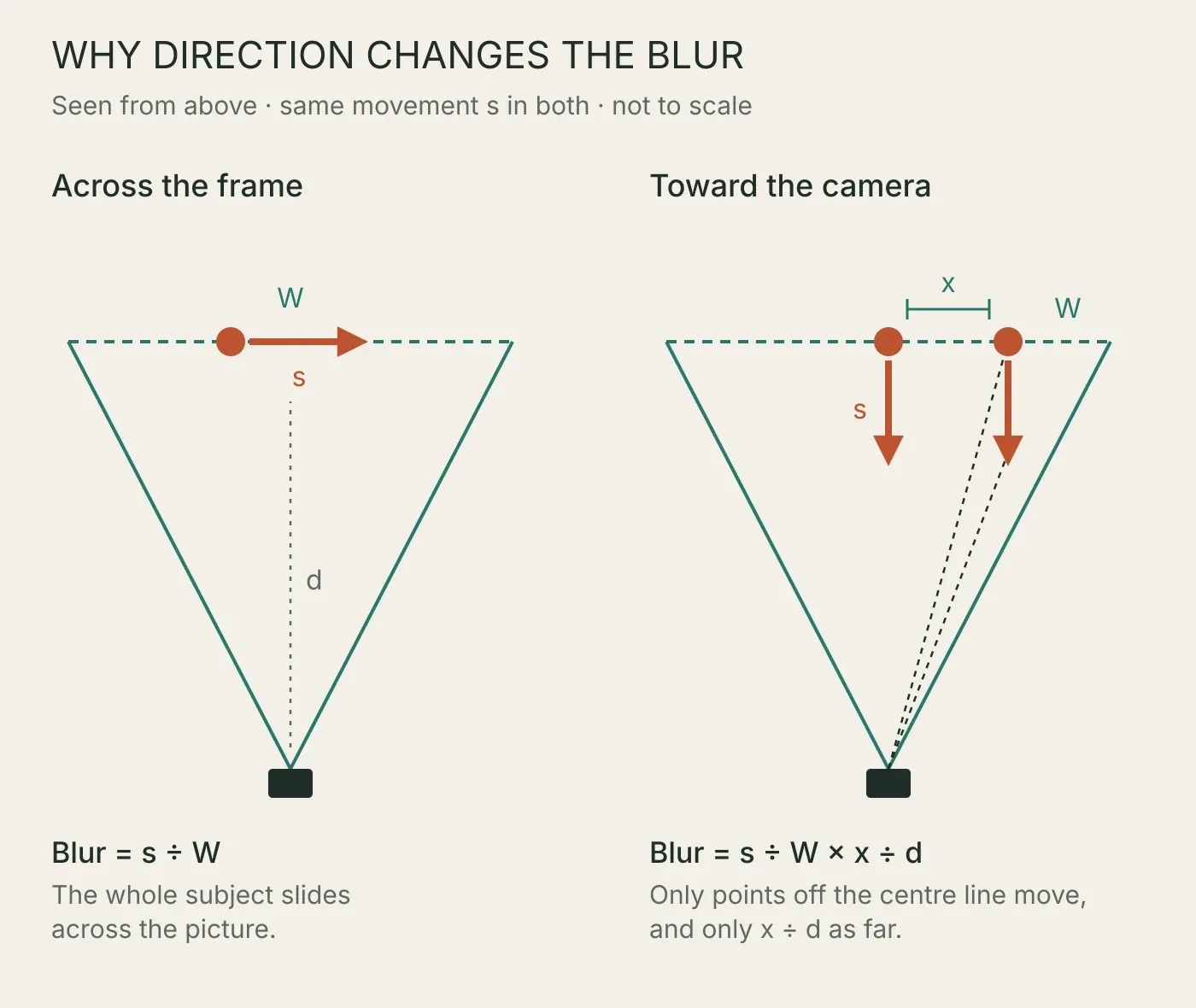
Original Afterlight diagram constructed from the geometry described in the text; not to scale.
For a point a distance x from the centre of the frame, at subject distance d, approaching motion blurs by x ÷ d of what the same movement across the frame would cause. The centre of an approaching subject doesn't shift at all.
Take a runner coming straight at a camera from 10 metres. The top of the runner's head is about 0.9 metres above the centre of the frame, so it blurs by 0.9 ÷ 10, about a tenth of the across-the-frame amount. For the forward motion alone, that is more than three stops of room. The runner's bounce and swinging arms and legs still move across the frame, and they blur as much as they would from the side. The rule weakens with wide lenses close in. At the edge of a 24 mm frame on full frame, x ÷ d is 18 ÷ 24, or 0.75, so an approaching subject near the edge of a wide shot gets only a quarter less blur.
Motion at an angle sits between the two. The crossing time handles it without any trigonometry: a subject running diagonally takes longer to cross the frame than one running straight across, and the longer time is exactly the allowance you get.
An approaching subject has a different problem: it keeps changing distance, so focus has to follow it. When a head-on shot comes out soft, check whether the softness is defocus or motion before you raise the shutter speed.
Panning moves the blur to the background
Panning, swinging the camera to follow the subject, makes the subject's crossing time very long and gives the background the short one. That lets you use a much slower shutter speed for the body of the subject, at the cost of everything that doesn't move with it.
Pan with the cyclist from the table, 10 metres away with a 35 mm lens, and the camera turns at the same rate the cyclist would otherwise have crossed the frame. A distant background now takes about 2 seconds to cross the frame instead. At 1/60, it blurs by roughly 1/120 of the frame width, about 16 pixels on a 1,920-pixel screen: plainly streaked, while the cyclist's body can hold if the pan is smooth and matched.
Limbs don't pan with you. The top of the wheel and a foot in mid-swing move forward relative to the body at about the subject's own speed, so at 1/60 they blur almost as much as an unpanned cyclist would. That is usually the look panning photographers want. If you want the face sharp and the wheels turning, panning is the method; if you want the spokes frozen, it isn't.
What the faster shutter speed costs
Each halving of the shutter time costs one stop of light. Going from 1/250 to 1/1000 is two stops, which you can take from the aperture (f/5.6 to f/2.8, with less depth of field) or from ISO (400 to 1600).
When the light runs short, keep the shutter speed the subject needs and let ISO or brightening the raw file make up the difference. Our guide to raising ISO or brightening later explains how to choose between those two once the shutter speed and aperture are fixed. Noise can be reduced in processing. Motion blur smears detail along the direction of travel, and it is far harder to undo afterwards.
The opposite mistake costs something too. A shutter much faster than the subject needs buys nothing visible and spends light you could have used for a lower ISO or a smaller aperture. If a landscape needs the depth of f/16 and the grass in it only drifts in a breeze, the crossing time tells you how slow you can go.
How this guide was made
This guide is desk-researched and calculated. Afterlight did not photograph moving subjects or measure blur in real photographs for it. The method, the viewing allowances and the worked table are our own reproducible arithmetic: scene width = distance × 36 mm ÷ focal length × (1 − focal length ÷ distance), crossing time = scene width ÷ subject speed, shutter time = crossing time ÷ the viewing number. Subject speeds come from the peer-reviewed studies linked beside them; 50 km/h is a common urban speed limit, not a measurement. The approaching-subject relationship follows from the same geometry.
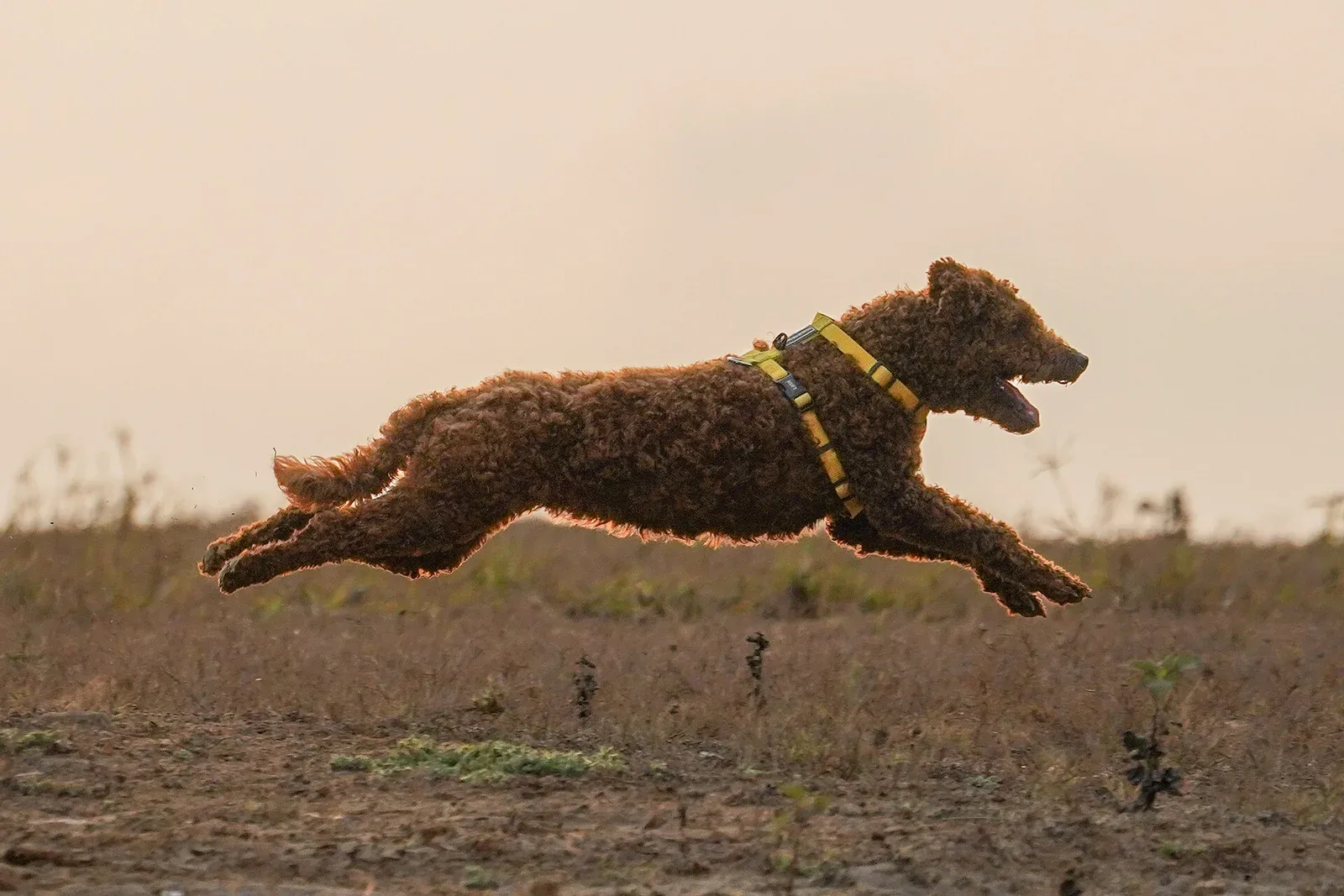
The lead photograph is by Timothy A. Gonsalves, from Wikimedia Commons, CC BY-SA 4.0, resized and converted to WebP; its file records 1/2000 s, f/8, ISO 800 and 300 mm on a Sony A7C. The blur comparison is a simulation built from that photograph, and it shares its licence. The direction diagram is an original Afterlight construction. Research, calculations, image processing and writing were AI-assisted, and the draft was checked by a separate AI reviewer.
← Back to the journal6 answers