Answers / Camera Basics
Why are there stripes in my photos under LED lights?
Desk-researched answer
Short answer
The stripes are the lights flickering faster than you can see, recorded by a shutter that exposes the frame one row at a time. Lamps on mains power usually pulse at twice the mains frequency, 100 times a second where the mains is 50 Hz and 120 where it is 60 Hz, so each row of the sensor catches a brighter or darker moment. What fixes it depends on what you are photographing:
- A still or slow subject: use the mechanical shutter, if your camera has one, and a speed that lasts whole flicker cycles: 1/50 or 1/100 s on 50 Hz mains, 1/60 or 1/125 s on 60 Hz.
- A moving subject that needs a faster speed: no faster speed cancels the flicker, so accept a trade. The mechanical shutter turns stripes into a single gradient, and anti-flicker shooting times each frame to the bright part of the cycle so a burst stays even.
- Dimmed lights, stage lights or LED screens: if stripes survive 1/50 s (on 50 Hz mains) or 1/60 s (on 60 Hz), the light switches at its own, faster rate. Use your camera's high-frequency flicker mode to fine-tune the shutter speed until the bands fade.
Why LED flicker turns into stripes
A camera's shutter does not start every part of the exposure at the same instant. An electronic shutter resets the sensor line by line and then reads it out line by line, and a mechanical shutter's curtains sweep across the sensor. Each row is exposed for the same length of time, but each row is exposed at a slightly different time, as a Kodak image-sensor patent puts it. Sony's explanation of flicker draws the consequence: "Because the exposure timing varies at the top and bottom of the image sensor, brightness and colors at the top and bottom of captured images may vary."
Under a steady light that timing does not matter. Under a light whose output rises and falls, a row exposed while the lamp was bright records more light than a row exposed while it was dim. Repeat that down the frame and you get bands that run along the rows: horizontal in a landscape frame, vertical when you turn the camera for a portrait.
Two numbers decide what you see:
- How many bands cross the frame is the flicker frequency multiplied by the time the shutter takes to sweep the sensor. A lamp flickering at 100 Hz completes one cycle every 10 milliseconds. A shutter that takes 1/15 s (67 ms) to read the sensor spans 6.7 cycles, so the frame shows six or seven dark bands. A shutter that sweeps in 1/300 s (3.3 ms) spans a third of a cycle, which shows as a single gradient from top to bottom rather than stripes.
- How strong the bands are depends on how much of a flicker cycle each row averages. A row exposed for 1/1000 s sees a single instant of the cycle and records the lamp's full swing. A row exposed for 1/125 s averages most of a cycle and keeps less than a quarter of it. A row exposed for exactly 1/100 s collects one whole cycle; every row then receives the same light, wherever its exposure started, and the bands disappear.
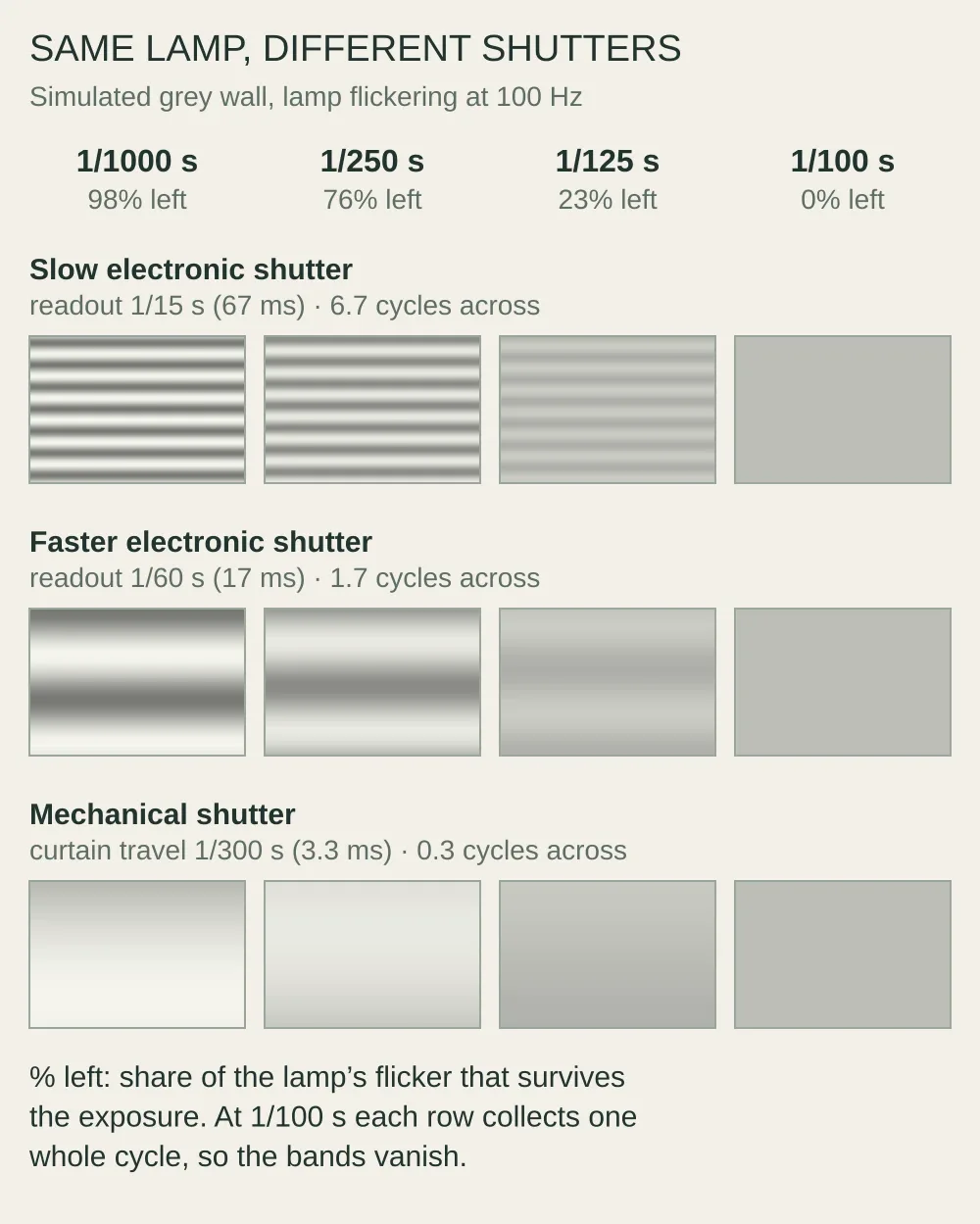
Simulation, not photographs: Afterlight calculated each row's average brightness under a lamp flickering at 100 Hz with 60% modulation depth. The readout and shutter speeds are illustrative values.
The same calculation explains a second symptom. Even when the sweep is fast enough to avoid stripes, each frame catches the flicker at a different moment, so a burst of pictures can change in brightness, and sometimes color, from one frame to the next.
Which shutter speeds remove the stripes
The exposure must last a whole number of flicker cycles. Most mains-powered lamps flicker at twice the mains frequency. The US Department of Energy's lighting researchers describe the classic case, magnetic ballasts producing modulation "at twice the mains frequency, 100 Hz or 120 Hz for 50 Hz or 60 Hz distribution", and the same review finds LED lamps doing it too. Canada's workplace-safety agency gives the general rule: lamps on AC power flicker at twice the power line frequency. One flicker cycle therefore lasts 1/100 s on 50 Hz mains and 1/120 s on 60 Hz mains.
| Mains | Flicker | Speeds that cancel it |
|---|---|---|
| 50 Hz | 100 Hz | 1/100, 1/50, 1/25 s |
| 60 Hz | 120 Hz | 1/120, 1/60, 1/40, 1/30 s |
Prefer 1/50 s or 1/60 s when the picture allows it. Some early, low-cost LED lamps without a proper driver flicker at the mains frequency itself as well as twice it, which the Department of Energy review also documents, and 1/50 s and 1/60 s are a whole cycle of that slower flicker as well. 1/100 s and 1/120 s are only half of one.
Standard stills speeds in thirds of a stop jump from 1/100 to 1/125, so most cameras cannot set 1/120 s. The nearby 1/125 s leaves about 4% of the flicker, faint enough to ignore in most pictures, and it is what Nikon lists for 60 Hz in its flicker-reduction advice. The speeds on the dial are also rounded labels: Nikon notes that the setting shown as 1/500 s is precisely 1/512 s. If a camera's 1/125 is really 1/128 s and its 1/60 really 1/64 s, about 7% of 120 Hz flicker remains, which is still faint. The 50 Hz speeds are barely affected: a true 1/50.8 s or 1/101.6 s leaves under 2%. The high-frequency modes described below can set 120.0 exactly. On 50 Hz mains the familiar 1/30 s is three and a third cycles and leaves about 8%. These percentages, like those below, are the share of the lamp's own flicker left in the picture, from Afterlight's calculation in the chart.
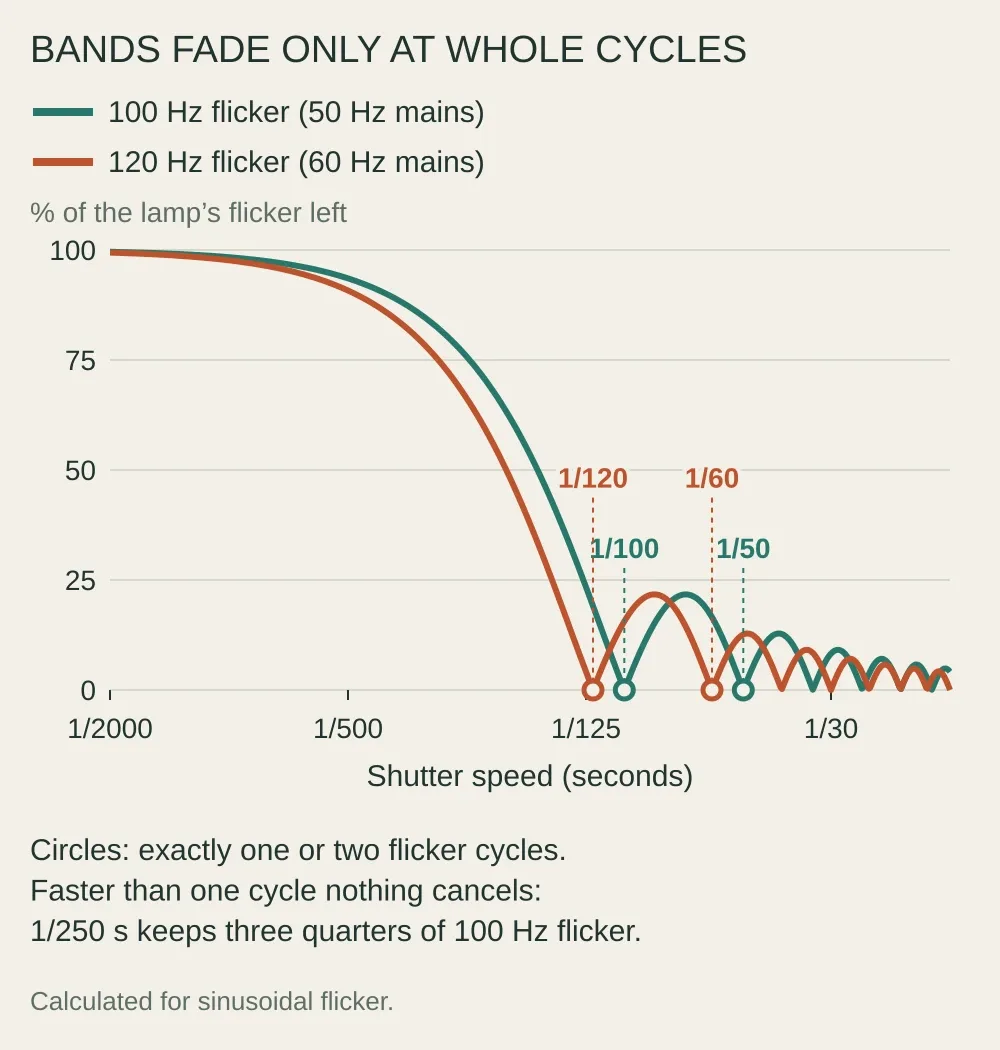
Calculated by Afterlight for a sinusoidal flicker. A real lamp's waveform adds harmonics at whole multiples of its flicker frequency, and those cancel at the same shutter speeds.
Three consequences follow from the chart, and they are where most advice goes wrong:
- Faster speeds make the stripes stronger, not weaker. At 100 Hz, 1/250 s keeps about three quarters of the lamp's flicker and 1/1000 s keeps almost all of it. No speed faster than 1/100 s (on 50 Hz mains) or 1/120 s (on 60 Hz) cancels the flicker.
- "Any multiple of 50" is half right. It works for exposures slower than one cycle: 1/50 s is two cycles at 100 Hz. Read the other way, as 1/150, 1/200 or 1/400 s, it fails, because those exposures are fractions of a cycle. At 100 Hz, 1/200 s keeps about 64% of the flicker.
- The mains frequency, not the flicker frequency, is what most menus ask for. A camera's 50 Hz setting is for 100 Hz flicker. Shooting at 1/50 s works because it is two flicker cycles, not because it matches the mains.
If you do not know which supply you are on, take one frame at 1/50 s and one at 1/60 s of the same lit wall, with the electronic shutter so there are several bands to judge. The clean frame names the grid: at 1/60 s, 100 Hz flicker leaves about 17% of its strength, and at 1/50 s, 120 Hz flicker leaves about 13%. Most of North America and part of South America run at 60 Hz, and most of the rest of the world at 50 Hz, according to an IEEE history of the two standards. Japan is split: principally 50 Hz in eastern Japan and 60 Hz in western Japan.
Why the electronic shutter makes stripes worse
An electronic shutter sweeps the sensor much more slowly than a mechanical one, so it packs more bands into each frame. Sony's support page says it plainly: the mechanical shutter's slit moves in about 4 milliseconds, while an electronic shutter needs "several dozen milliseconds" to read the whole sensor line by line.
Measured stills readout times, from the crowdsourced rolling-shutter table maintained by Horshack (raw, single shot, highest bit depth), show how much this varies between current cameras:
| Shutter | Measured sweep time | Flicker cycles across the frame at 100 Hz | At 120 Hz |
|---|---|---|---|
| Sony a7R V, electronic | 100.5 ms | 10 | 12 |
| Sony a7 IV, electronic | 67.6 ms | 6.8 | 8.1 |
| Nikon Zf, electronic (14-bit) | 50.5 ms | 5.1 | 6.1 |
| Canon EOS R6 Mark II, electronic | 14.7 ms | 1.5 | 1.8 |
| Nikon Z8, electronic (stacked sensor) | 3.7 ms | 0.37 | 0.45 |
| Mechanical curtains, several bodies | 3.2 to 4.1 ms | 0.3 to 0.4 | 0.4 to 0.5 |
The cycle count is roughly the number of dark bands you can expect at a fast shutter speed. On a camera with a slow electronic readout, switching to the mechanical shutter (or electronic first curtain, which sweeps at about the same speed in the same table) turns six to twelve stripes into less than half a cycle: a gradient across the frame instead of a ladder of bands. That is why "use the mechanical shutter" is the first fix that works for most people.
The mechanical shutter does not remove the flicker itself. Below the flash sync speed, both curtains are fully open for part of the exposure, which is often taken to mean that the whole frame is exposed at once. It is not: each row's exposure still begins when the first curtain passes it, so the start times remain spread over the 3 to 4 milliseconds the curtain takes to cross. That third of a cycle can still be strong. By Afterlight's calculation, at 1/1000 s under a lamp with 60% flicker depth, one end of the frame can be up to about 1.7 stops darker than the other, and under a fully on-off LED one end can go nearly black. Where the gradient falls changes from frame to frame.
Some cameras have no mechanical shutter to switch to: Nikon's Z8 and Z9 and Sony's a9 III among them. Their electronic readouts are fast enough to do the mechanical shutter's job, so go straight to the shutter speeds above, or to the anti-flicker and high-frequency modes below, which the Z8 offers with its electronic shutter.
A global shutter, such as the one in Sony's a9 III, exposes all pixels at the same time, so flicker cannot form bands within a frame. It can still make one frame brighter than the next unless the exposure lasts whole flicker cycles.
What anti-flicker modes actually do
Cameras offer two different tools, and they solve different problems.
Anti-flicker shooting times the shot. Canon calls it Anti-flicker shoot., Nikon Photo flicker reduction, Sony Anti-flicker Shoot., Fujifilm Flicker reduction and OM System Anti-Flicker Shooting. The camera measures the flicker and releases the shutter so that the exposure falls in the bright part of each cycle, which Sony describes as lasting slightly longer than the mechanical shutter's 4 ms sweep. Every frame of a burst then gets similar exposure and color. It only recognizes mains flicker: "Flicker at a frequency other than 100Hz or 120Hz cannot be detected", says Canon's EOS R6 Mark II manual, and Nikon and Sony state the same 100 and 120 Hz limit. The same Canon page warns that the shutter-release lag may become longer and continuous shooting slower and irregular.
On most bodies anti-flicker shooting needs the mechanical shutter. Sony's a7 IV does not offer it with the electronic shutter, Fujifilm's X-T5 switches it off when the electronic shutter is used, and Nikon's Z6III ignores it with the electronic shutter. Sony explains why: during a slow electronic sweep, "No matter when shutter movement begins, the dark time during fluorescent light flickering cannot be avoided." Cameras with fast readouts are the exception. Canon's EOS R1 offers it with the electronic shutter, at 20 frames per second instead of 40.
High-frequency flicker modes fine-tune the shutter speed. Canon calls this HF anti-flicker shooting, Nikon High-frequency flicker reduction, Sony Var. Shutter, Fujifilm Flickerless S.S., OM System Flicker Scan and Panasonic Synchro Scan. Instead of the usual third-stop steps, the camera lets you set speeds such as 250.6, 253.3, 256.0 and 258.8 so you can land on a whole number of cycles of a light that is not on mains frequency. These modes work with the electronic shutter, in shutter priority or manual exposure. Some do the search for you: the EOS R6 Mark II detects light sources from 50.0 to 2011.2 Hz and recommends a speed, and the Nikon Z8 lets you enter the light's frequency, with presets for LED-wall rates such as 3,840 and 7,680 Hz, and then offers only speeds that are whole multiples of its cycle.
To use one by hand, start near the speed you want and nudge it in the fine steps, in either direction, while watching the bands in the viewfinder until they fade. Check a test frame: Sony warns that the faster the shutter speed, the more the display before shooting may differ from the recorded image.
When dimmers and stage lights break the simple rule
The 1/100 s and 1/120 s rule assumes the lamp flickers at twice the mains frequency. Many LED fixtures do not. Dimming an LED by pulse-width modulation switches it fully on and off many times a second; the Department of Energy's review notes that PWM applies 100% modulation and that some products run it at 400 to 2,000 Hz. Stage fixtures let technicians choose the switching frequency, in a range from 800 Hz to 25 kHz on one manufacturer's lights, and LED video walls are sold on refresh rates such as 3,840 or 7,680 Hz.
High-frequency flicker changes three things:
- The safe speeds change. A light switching at exactly 1,000 Hz completes a cycle every millisecond, so 1/1000, 1/500, 1/250 and 1/100 s all cancel it. In practice you rarely know the frequency, and a light a few percent away from every speed on the dial bands at all of them.
- There are more, finer bands. At 1,000 Hz, even the Nikon Z8's 3.7 ms electronic readout spans almost four cycles, and the Sony a7 IV's spans 68: dense, fine stripes rather than a few broad ones.
- Slower speeds help a lot even when they are not exact. For a light switching fully on and off, band strength cannot exceed 1 divided by (2 × flicker frequency × exposure time), by Afterlight's calculation. For a light switching at around 1,000 Hz, that ceiling is about 5% of the flicker at 1/100 s, against about 50% at 1/1000 s.
Dimming often makes things worse. The European Union's lighting rules limit flicker and the stroboscopic effect only at full load, and the Department of Energy's review found that early LEDs on ordinary dimmers often introduced flicker "even though it was not present at full output". A room that photographs cleanly at full brightness can band once the lights are turned down for a talk or a first dance.
At a concert, a conference or a television studio, the most effective fix may be a conversation. Stage fixtures let the operator set the LED switching frequency, and Chauvet's advice is to step through the settings while watching the camera, because no single one suits every camera. Afterlight's calculation adds one general point: at ordinary shutter speeds, a higher frequency leaves weaker bands.
How this answer was made: AI-assisted desk research from camera makers' manuals and support pages, US Department of Energy lighting research, EU regulation and a crowdsourced readout-time table. The band-strength and band-count figures and both diagrams are Afterlight's own calculation for a sinusoidal flicker. Afterlight did not photograph these lights for this answer.
← All answersAfterlight